ANNOTATE PDF
Annotate and highlight PDFs on your phone
Mark up PDFs on iPhone, iPad, and Android with PDFix Edit PDF tools. Highlight important passages, draw with pen or highlighter, erase markup, and add vector shapes - all on your phone.
Scan to install on your phone
- Pen, highlighter & shapes
- iPhone, iPad & Android
- Inside Edit PDF
Mark Up PDFs Without a Desktop Workflow
When you need to highlight passages or mark areas that need attention, waiting for a computer slows you down. PDFix puts annotation tools inside Edit PDF on your phone.
01
Review happens on the phone
Study materials, drafts, and shared PDFs often show up when you only have your phone - not a desktop markup tool.
02
Annotation lives inside Edit PDF
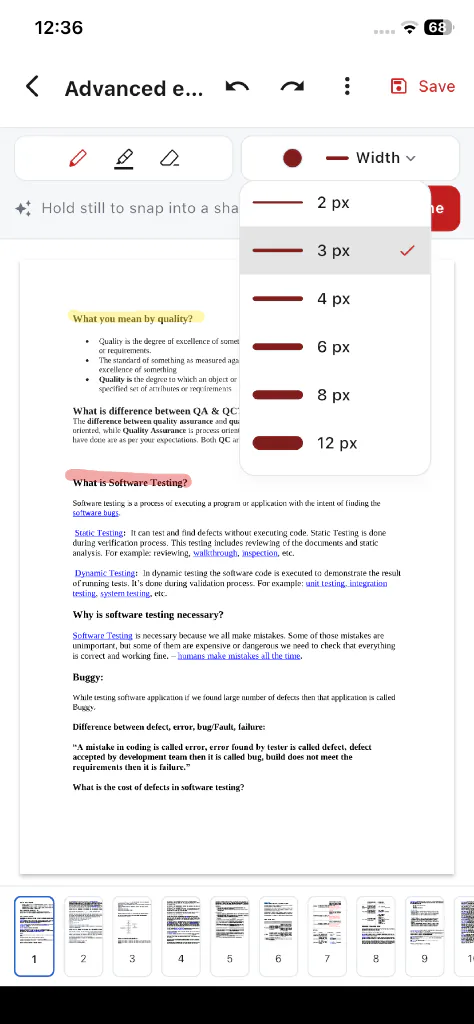
Pen, highlighter, eraser, and shapes are part of the Edit PDF tool - not a separate catalog tool you have to hunt for.
03
Mark up, then save or share
Highlight what matters, draw attention to key spots, and save or share when you are ready - on iPhone, iPad, or Android.
Annotation Tools Inside Edit PDF
These capabilities match the confirmed Edit PDF drawing and markup tools. Text editing is covered on the Edit PDF Text page.
Highlight important content
Use the highlighter drawing tool to mark passages, and apply highlight formatting when you are working with text in Edit PDF.
Mark up with pen
Draw freehand notes and marks directly on the page with the pen tool.
Erase markup
Remove strokes you no longer need with the eraser - so you can clean up markup before you share.
Add vector shapes
Insert shapes such as line, arrow, rectangle, rounded rect, ellipse, triangle, star, and callout to mark areas that need attention.
How to Annotate a PDF on Your Phone
Markup tools live inside Edit PDF.
- 1
Open your PDF
Launch Edit PDF from the PDFix home screen and pick the document from your device storage.
- 2
Choose an annotation tool
Select pen, highlighter, eraser, or a vector shape from the Edit PDF tools.
- 3
Mark up the document
Highlight passages, draw on the page, or place shapes where you need attention.
- 4
Save or continue
Keep the marked-up PDF on your device, continue editing text if needed, or share when you are ready.
Practical ways to annotate PDFs on your phone
Everyday markup - not enterprise review theater.
Study documents on your phone
Highlight key passages while reading course materials or reference PDFs away from a desk.
Review drafts before sharing
Mark sections that need attention so the next reader can see what you flagged.
Mark up before you send
Add highlighter strokes or shapes, then share the annotated PDF from your phone.
Review PDFs while traveling
Annotate on iPhone, iPad, or Android when you only have your mobile device.
Annotate PDFs on iPhone, iPad, and Android
Markup tools ship inside Edit PDF on both major platforms. Related pages cover text editing, signing, and device-specific overviews.
- Annotate PDFs on iPhone and iPad
App Store-focused overview of PDFix for iOS devices.
- Annotate PDFs on Android
Google Play-focused overview of PDFix for Android phones.
- Edit PDF text on your phone
Change existing PDF text in place when a document needs more than markup.
- Sign PDFs on your phone
Draw, type, or upload a signature and place it on the page.
- Scan documents to PDF with OCR
Camera or gallery import, multi-page review, optional on-device searchable OCR.
- See all PDFix tools
See all 15 tools, pricing, and how on-device PDF editing works.
- PDFix support
Contact support if you need help with the app or your subscription.
Your PDFs, Processed on Your Device
PDF processing stays on the phone. Files are not uploaded to Cloud for edit / convert / scan / sign.
- Edit and annotate operations process files on your device
- PDF files are not uploaded to Cloud for those tool operations
- Subscriptions and account profiles follow your login across devices. PDF files themselves do not upload or sync to the cloud.
The app may still use the network for App Store or Google Play receipts, Free-tier ads, crash and performance diagnostics, push notifications, and optional account sign-in.
Frequently Asked Questions
Straight answers about highlighting and annotating PDFs with PDFix on your phone.
Yes. Inside Edit PDF you can use the highlighter drawing tool to mark passages, and apply highlight formatting when working with text. Annotation tools live in Edit PDF - not as a separate catalog tool.
Download PDFix
Get the mobile PDF editor with annotation tools for iPhone, iPad, and Android. Free to download, with optional Premium and no ads.
- Annotate and highlight PDFs on your phone
- Pen, highlighter, eraser, and shapes inside Edit PDF
- Free accounts can edit 1 PDF per day.
- Available on App Store and Google Play
- PDF processing stays on your device
- Optional Premium: no ads
Scan to install on your phone
Optional Premium is available in-app via Apple or Google Play at display prices of $3.99 per month or $20.99 per year. No browser upload required.