SCAN & OCR
Scan documents and create searchable PDFs
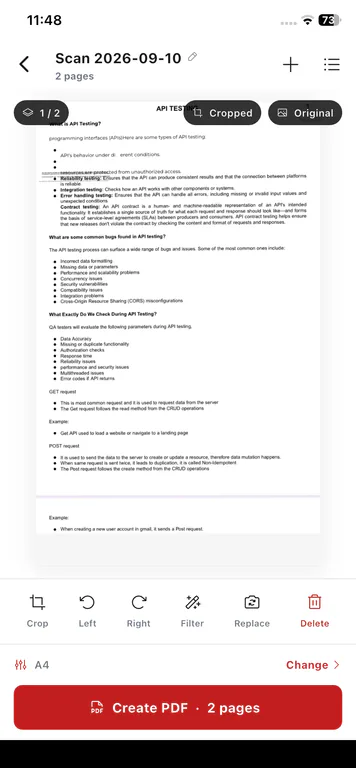
Use PDFix Image to PDF to scan with your camera or import photos from your gallery, build multi-page PDFs, and optionally run on-device OCR so scanned text becomes searchable - on iPhone, iPad, and Android.
Scan to install on your phone
- Camera or gallery
- Optional on-device OCR
- iPhone, iPad & Android
Turn Paper Into a PDF You Can Use
Paper documents are hard to search and share. PDFix Image to PDF lets you capture pages on your phone and optionally make the PDF searchable with on-device OCR.
01
Paper stays stuck on paper
Printed pages and notes are hard to find later when they only exist as photos or physical stacks.
02
Your phone is already the scanner
Capture pages with the camera or import photos from your gallery, then compile them into a PDF without a desktop scanner.
03
Searchable when you need it
Optional on-device OCR can turn a scanned PDF into selectable, searchable text - OCR is a capability inside Image to PDF, not a separate product.
Scan, Build, and Optionally OCR
Capabilities below match the Image to PDF tool. OCR is optional and runs on your device where applicable.
Scan with your phone
Capture paper documents with your camera and bring them into the Image to PDF workflow.
Turn images into PDFs
Import photos from your gallery - including multi-photo import - and create a PDF from them.
Create multi-page PDFs
Add multiple pages, review the document, and adjust page order before you save.
Make scanned PDFs searchable
Optionally generate a searchable PDF with on-device OCR so text can be selected and searched. The in-app OCR tab is a shortcut into this same workflow.
How to Scan Documents to PDF on Your Phone
Camera or gallery into a PDF, with optional OCR when you need searchable text.
- 1
Scan a document or select images
Open Image to PDF, capture pages with the camera, or import photos from your gallery.
- 2
Build your PDF
Review the pages you added and adjust page order so the document is ready.
- 3
Optionally run OCR
When you want searchable text, use optional on-device OCR to generate a searchable PDF.
- 4
Save and use the PDF
Keep the PDF on your device, then open it later to edit, annotate, sign, or share.
Practical ways to scan and OCR on your phone
For receipts, notes, and paper on your phone, not a scanning department.
Digitize paper documents
Capture printed pages with your phone and keep them as PDFs you can find later.
Create searchable copies of printed documents
Use optional OCR so you can search and select text in a scanned PDF.
Scan notes into a PDF
Turn handwritten or printed notes into a multi-page PDF from your camera or gallery.
Prepare scans for later editing or sharing
Build the PDF on your phone, then edit text, annotate, or share when you are ready.
Scan and OCR on iPhone, iPad, and Android
Image to PDF with optional OCR is available on both major platforms. Related pages cover editing, annotating, signing, and device-specific overviews.
- Scan documents on iPhone and iPad
App Store-focused overview of PDFix for iOS devices.
- Scan documents on Android
Google Play-focused overview of PDFix for Android phones.
- Edit PDF text on your phone
Change existing text in a PDF after you have scanned or imported it.
- Annotate and highlight PDFs
Highlight, draw, and add shapes inside Edit PDF on your phone.
- Sign PDFs on your phone
Draw, type, or upload a signature and place it on the page.
- See all PDFix tools
See all 15 tools, pricing, and how on-device PDF editing works.
- PDFix support
Contact support if you need help with the app or your subscription.
Your PDFs, Processed on Your Device
PDF processing stays on the phone. Files are not uploaded to Cloud for edit / convert / scan / sign.
- Scan, Image to PDF, and optional OCR process files on your device
- PDF files are not uploaded to Cloud for those tool operations
- Subscriptions and account profiles follow your login across devices. PDF files themselves do not upload or sync to the cloud.
The app may still use the network for App Store or Google Play receipts, Free-tier ads, crash and performance diagnostics, push notifications, and optional account sign-in.
Frequently Asked Questions
Straight answers about scanning documents and optional OCR with PDFix on your phone.
Yes. PDFix Image to PDF lets you scan with your camera or import photos from your gallery and create a PDF on your phone. OCR is optional inside this same tool - not a separate product.
Download PDFix
Get the mobile PDF scanner and OCR workflow for iPhone, iPad, and Android. Free to download, with optional Premium and no ads.
- Scan documents or import photos into PDFs
- Optional on-device OCR for searchable text
- Free accounts can use other PDF tools on up to 2 PDFs per day.
- Available on App Store and Google Play
- PDF processing stays on your device
- Optional Premium: no ads
Scan to install on your phone
Optional Premium is available in-app via Apple or Google Play at display prices of $3.99 per month or $20.99 per year. No browser upload required.