EDIT PDF TEXT
Edit PDF Text on Your Phone
PDFix lets you edit existing text inside PDF documents directly on your phone. Tap the text, make your changes, and save the same file with your edits.
Scan to install on your phone
- Edit text in place
- iPhone, iPad & Android
- On-device processing
Make Changes Without Starting Over
Reading a PDF is easy. Changing the text already inside it is the harder job - and the reason people look for a mobile PDF text editor.
01
Reading is not editing
A PDF viewer lets you open and scroll a document. It does not let you fix a name, date, or sentence already on the page.
02
Edit the existing text
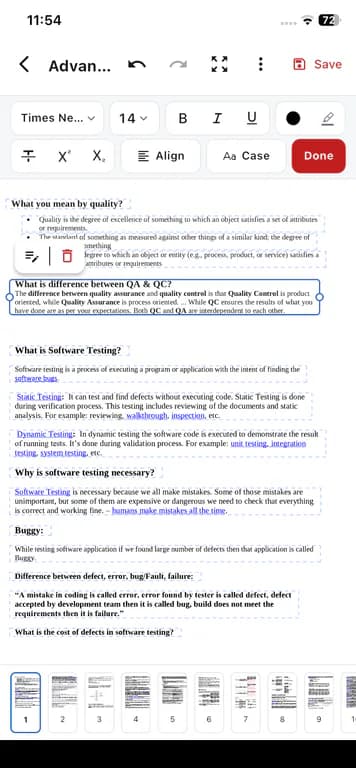
PDFix Edit PDF lets you tap text already in the file and change it in place - so you update the document you received instead of rebuilding it.
03
From your phone
When a computer is not handy, you can still correct and update PDFs on iPhone, iPad, or Android before you send them.
Edit Existing PDF Text
Capabilities below match the in-app Edit PDF tool. Annotation and markup are available inside the same tool when you need them.
Edit existing text
Tap text already present in a PDF and change it in place - without recreating the whole document.
Adjust text appearance
Format typography with bold, italic, underline, highlight, and font changes while you edit.
Make corrections on the go
Fix typos and update names or dates on your phone before you send the file.
Mark up when needed
While editing, draw with pen, highlighter, and eraser, or insert shapes such as line, arrow, rectangle, ellipse, and callout. Annotation lives inside Edit PDF.
How PDF Text Editing Works
Open the file, change the text, save it.
- 1
Open your PDF
Launch Edit PDF from the PDFix home screen and pick the document from your device storage.
- 2
Select the text
Tap the existing text you want to change so you can edit it in place.
- 3
Make your changes
Update the wording and apply formatting such as bold, italic, underline, highlight, or fonts.
- 4
Save or share
Keep the updated PDF on your device and share it when you are ready - processing stays on your phone.
Practical ways to edit PDF text on your phone
For small fixes on a phone, not a desktop PDF suite.
Correct a document before sending it
Catch a typo or outdated detail and fix it before the file leaves your phone.
Update information in an existing PDF
Change names, dates, or short passages without rebuilding the document from scratch.
Fix text while away from a computer
Handle quick edits when you only have your phone - on iPhone, iPad, or Android.
Make quick document changes
Open the PDF, edit the text you need, and move on without a browser upload workflow.
Edit PDFs on iPhone, iPad, and Android
PDFix is a mobile PDF editor app available on both major platforms. Pick the landing page that matches your device.
- Edit PDFs on iPhone and iPad
App Store-focused overview of PDFix for iOS devices.
- Edit PDFs on Android
Google Play-focused overview of PDFix for Android phones.
- Sign PDFs on your phone
Draw, type, or upload a signature and place it on the page.
- Annotate and highlight PDFs
Highlight, draw, and add shapes inside Edit PDF on your phone.
- Scan documents to PDF with OCR
Camera or gallery import, multi-page review, optional on-device searchable OCR.
- See all PDFix tools
See all 15 tools, pricing, and how on-device PDF editing works.
Your PDFs, Processed on Your Device
PDF processing stays on the phone. Files are not uploaded to Cloud for edit / convert / scan / sign.
- Edit operations process files on your device
- PDF files are not uploaded to Cloud for those tool operations
- Subscriptions and account profiles follow your login across devices. PDF files themselves do not upload or sync to the cloud.
The app may still use the network for App Store or Google Play receipts, Free-tier ads, crash and performance diagnostics, push notifications, and optional account sign-in.
Frequently Asked Questions
Straight answers about editing existing PDF text with PDFix on your phone.
Yes. PDFix Edit PDF lets you tap existing text in a PDF and change it in place on your phone, including formatting options such as bold, italic, underline, highlight, and fonts.
Download PDFix
Get the mobile PDF text editor for iPhone, iPad, and Android. Free to download, with optional Premium and no ads.
- Edit existing PDF text on your phone
- Free accounts can edit 1 PDF per day.
- Available on App Store and Google Play
- PDF processing stays on your device
- Optional Premium: no ads
Scan to install on your phone
Optional Premium is available in-app via Apple or Google Play. No browser upload required.